I hear a lot of developers on social media claim that they created fully automated, end-to-end AI bot pipelines that create, build, test, and deploy apps from scratch. This idea appeals to me, so I gave it a shot.
I first tried and failed to create a working app pipeline (see future blog posts), so I decided to create a Minimum Viable Product (MVP) in the form of a bot that writes and publishes one blog post, once a day, every day.
Goals include:
- Writing a blog that people will want to read
- Publishing the blog to a production-grade website
- Following security best practices
- Full automation (no manual intervention)
The Approach
I use Gemini CLI on my Windows laptop for GenAI. The LLM write the blog in markdown and pushes it to my public repo on GitHub. GitHub Actions (GA) then use a static site generator to build the site from the markdown (adding the home page hyperlinks, menus, and style) and then pushes the HTML and Javascript to an Amazon S3 Hosted website with content caching, HTTPS and naked domain redirects. Gemini CLI uses a mounted SSH private key to push to GitHub, and GA uses an AWS Identity and Access Management (IAM) Role to push to AWS.
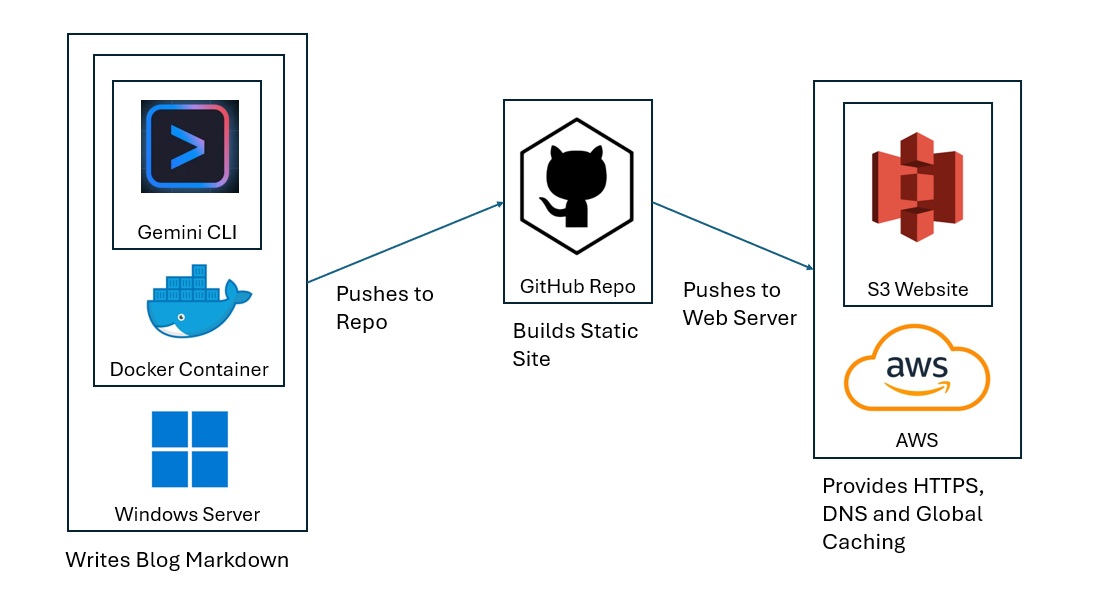
I chose Gemini CLI for GenAI. You can easily replace this service with ChatGPT, Claude, or Cursor. On the hosting end, you can replace S3 with Google Cloud, Azure, Oracle Cloud or any web hosting platform.
Create an AWS Role
GA uses OpenID Connect (OIDC) to authenticate to AWS without a password. OIDC requires an IAM Role and Policy.
I name the IAM Role GitHubActionsHoursLoveDeploy, since it will deploy to the S3 bucket that hosts https://hours.love.
The Role includes a trust policy that allows the hours.love repo to access resources in my AWS account. I limit the scope to the main branch.
{
    "Version": "2012-10-17",
    "Statement": [
        {
            "Effect": "Allow",
            "Principal": {
                "Federated": "arn:aws:iam::123456789012:oidc-provider/token.actions.githubusercontent.com"
            },
            "Action": "sts:AssumeRoleWithWebIdentity",
            "Condition": {
                "StringEquals": {
                    "token.actions.githubusercontent.com:aud": "sts.amazonaws.com"
                },
                "StringLike": {
                    "token.actions.githubusercontent.com:sub": [
                        "repo:hatdropper1977/hours.love:ref:refs/heads/main",
                        "repo:hatdropper1977/hours.love:ref:refs/heads/main"
                    ]
                }
            }
        }
    ]
}
The Role includes a policy that allows GA to both push web content to the S3 bucket and revoke the CloudFront cache.
{
    "Version": "2012-10-17",
    "Statement": [
        {
            "Sid": "S3Deploy",
            "Effect": "Allow",
            "Action": [
                "s3:PutObject",
                "s3:DeleteObject",
                "s3:GetObject",
                "s3:ListBucket"
            ],
            "Resource": [
                "arn:aws:s3:::hours.love",
                "arn:aws:s3:::hours.love/*"
            ]
        },
        {
            "Sid": "CloudFrontInvalidate",
            "Effect": "Allow",
            "Action": [
                "cloudfront:CreateInvalidation"
            ],
            "Resource": "*"
        }
    ]
}
Configure GitHub
We need to configure GitHub to both accept markdown from Gemini CLI and send content to AWS.
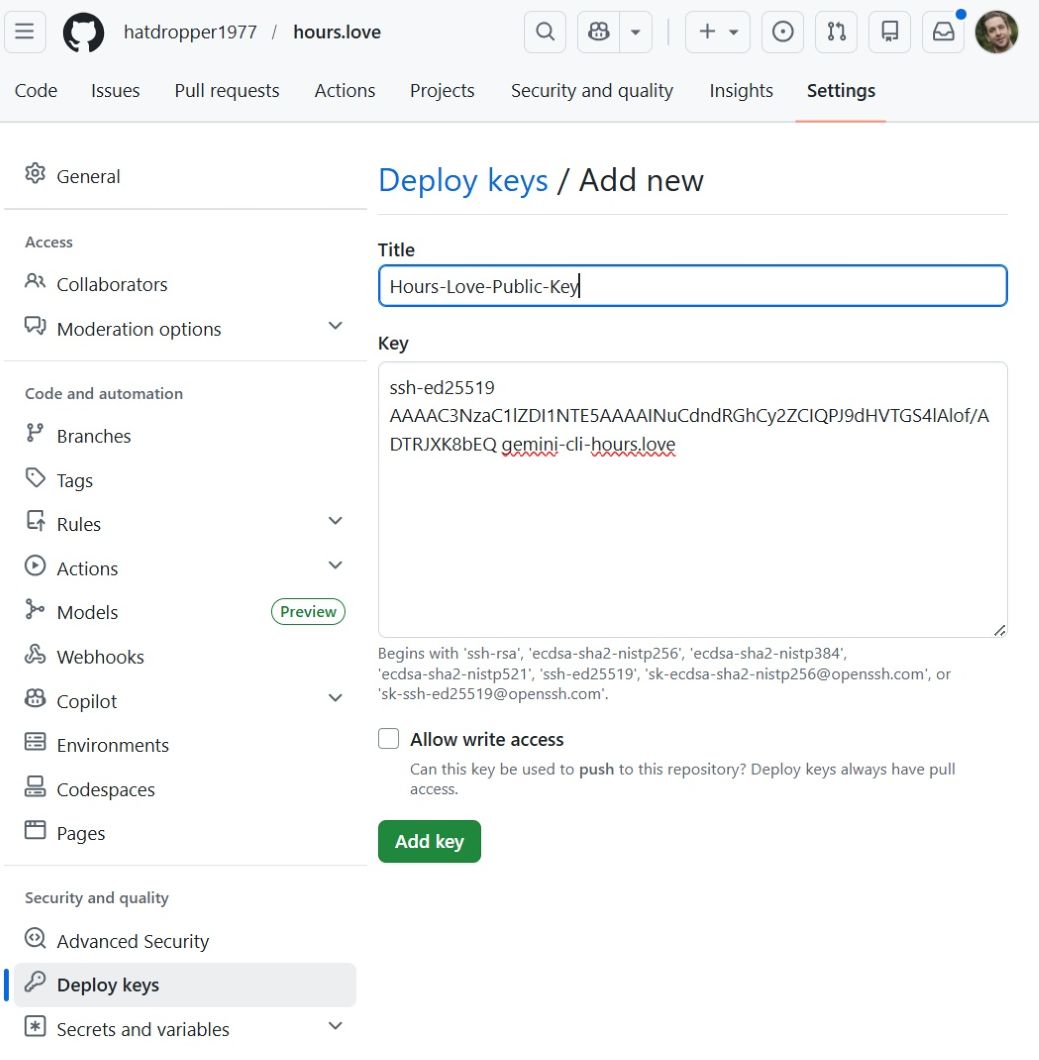
For the Gemini CLI, we paste our public key in Settings --> Deploy Keys --> Add Deploy Key.
For AWS, we create a YAML file that includes the AWS Resource Number (ARN) for the OIDC and push it to the repo in .github/workflows/deploy.yml.
name: Deploy

on:
  push:
    branches:
      - main
  workflow_dispatch:

permissions:
  contents: read
  id-token: write

concurrency:
  group: deploy-hours-love
  cancel-in-progress: true

env:
  AWS_REGION: us-east-1
  S3_BUCKET: hours.love
  CLOUDFRONT_DISTRIBUTION_ID: A12B3CDEFGHIJK

jobs:
  deploy:
    runs-on: ubuntu-latest

    steps:
      - name: Checkout
        uses: actions/checkout@v5

      - name: Setup Node
        uses: actions/setup-node@v6
        with:
          node-version: 24
          cache: npm
          cache-dependency-path: package-lock.json

      - name: Install dependencies
        run: npm install

      - name: Build site
        run: npm run build

      - name: Verify build output
        run: |
          test -d _site || (echo "Expected build output directory '_site' not found" && exit 1)

      - name: Configure AWS credentials
        uses: aws-actions/configure-aws-credentials@v6
        with:
          aws-region: ${{ env.AWS_REGION }}
          role-to-assume: arn:aws:iam::123456789012:role/GitHubActionsHoursLoveDeploy

      - name: Sync site to S3
        run: aws s3 sync _site/ s3://${S3_BUCKET}/ --delete

      - name: Invalidate CloudFront
        run: |
          aws cloudfront create-invalidation \
            --distribution-id "${CLOUDFRONT_DISTRIBUTION_ID}" \
            --paths "/*"
Note that this YAML also includes stanzas to build the site via npm.
We create another YAML file, in .github/workflows/ci.yml to create the Continuous Integration/ Continuous Deployment (CI/CD) pipeline.
name: CI

on:
  push:
    branches:
      - "gemini/**"
      - "setup/**"
  pull_request:
    branches:
      - main

jobs:
  build:
    runs-on: ubuntu-latest

    steps:
      - name: Checkout
        uses: actions/checkout@v4

      - name: Detect project
        id: detect
        run: |
          if [ -f package.json ]; then
            echo "type=node" >> $GITHUB_OUTPUT
          elif [ -f requirements.txt ]; then
            echo "type=python" >> $GITHUB_OUTPUT
          else
            echo "type=unknown" >> $GITHUB_OUTPUT
          fi

      - name: Setup Node
        if: steps.detect.outputs.type == 'node'
        uses: actions/setup-node@v4
        with:
          node-version: 20

      - name: Install deps
        if: steps.detect.outputs.type == 'node'
        run: npm ci

      - name: Lint
        if: steps.detect.outputs.type == 'node'
        run: npm run lint --if-present

      - name: Test
        if: steps.detect.outputs.type == 'node'
        run: npm test --if-present

      - name: Build
        if: steps.detect.outputs.type == 'node'
        run: npm run build --if-present
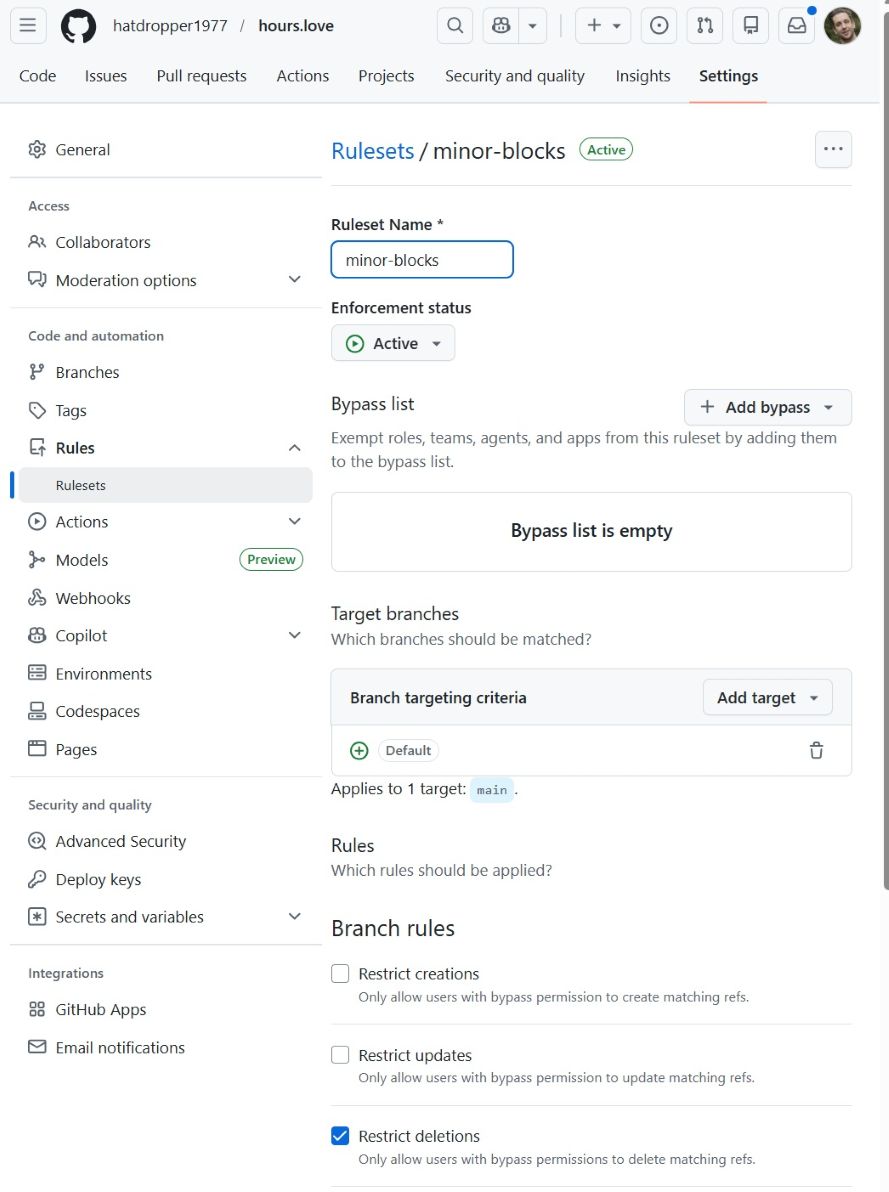
Create a Ruleset in Settings --> Rules --> Rulesets to prevent deletions and force pushes via the GA User Interface (UI).
Configure Gemini CLI
The Gemini CLI contains the blog writing intelligence. It writes a blog in Markdown and pushes the Markdown to GitHub. When GitHub receives the file, it kicks off the GA workflows captured in ci.yml and deploy.yml.
For security reasons, we deploy Gemini CLI in a docker container. This prevents Gemini from accessing any files on our laptop/ server that live outside of the deployment folder.
We use a file entrypoint.sh to configure and command the container. This includes the following actions:
- Mount SSH key (for GitHub)
- Clone/pull repo
- Generate prompt based on rules
- Call Gemini API (with search)
- Write markdown post
- Validate output
- Commit + push
The full file reads:
#!/usr/bin/env bash
set -euo pipefail

: "${GEMINI_API_KEY:?GEMINI_API_KEY is required}"
: "${GIT_REPO_SSH:?GIT_REPO_SSH is required}"
: "${GIT_USER_NAME:=Gemini CLI}"
: "${GIT_USER_EMAIL:=gemini-hours-love@users.noreply.github.com}"
: "${SSH_KEY_SRC:=/run/secrets/gemini_hours_love}"
: "${TZ:=America/New_York}"

export TZ
export HOME=/root
export REPO_DIR="${REPO_DIR:-/work/hours.love}"
export POSTS_DIR="${POSTS_DIR:-posts}"
export DATE_LOCAL="$(date +%F)"

# Context mode:
#   good   = titles only
#   better = titles + short snippets
export RECENT_POSTS_MODE="${RECENT_POSTS_MODE:-better}"

mkdir -p /root/.ssh /work
chmod 700 /root/.ssh

if [[ ! -f "$SSH_KEY_SRC" ]]; then
  echo "Missing SSH key at $SSH_KEY_SRC"
  exit 1
fi

cp "$SSH_KEY_SRC" /root/.ssh/gemini_hours_love
chmod 600 /root/.ssh/gemini_hours_love

cat >/root/.ssh/config <<'EOF'
Host github-hours-love
  HostName github.com
  User git
  IdentityFile /root/.ssh/gemini_hours_love
  IdentitiesOnly yes
EOF

chmod 600 /root/.ssh/config
ssh-keyscan github.com >> /root/.ssh/known_hosts 2>/dev/null
chmod 644 /root/.ssh/known_hosts

# --- clone or update repo ---
if [[ ! -d "$REPO_DIR/.git" ]]; then
  git clone "$GIT_REPO_SSH" "$REPO_DIR"
fi

cd "$REPO_DIR"

git config user.name "$GIT_USER_NAME"
git config user.email "$GIT_USER_EMAIL"

git fetch origin
git checkout main
git reset --hard origin/main

mkdir -p "$POSTS_DIR"

POST_FILE="$POSTS_DIR/${DATE_LOCAL}.md"

if [[ -f "$POST_FILE" ]]; then
  echo "Post already exists for ${DATE_LOCAL}; exiting."
  exit 0
fi

# --- recent post context ---
build_recent_titles_context() {
  local recent_files=()
  mapfile -t recent_files < <(find "$POSTS_DIR" -maxdepth 1 -type f -name "*.md" ! -name "${DATE_LOCAL}.md" | sort -r | head -n 5)

  if [[ ${#recent_files[@]} -eq 0 ]]; then
    echo "No recent posts yet."
    return
  fi

  for f in "${recent_files[@]}"; do
    local title
    title="$(grep -m1 '^title:' "$f" | sed 's/^title:[[:space:]]*//')"
    if [[ -z "$title" ]]; then
      title="$(basename "$f" .md)"
    fi
    echo "- ${title}"
  done
}

build_recent_snippets_context() {
  local recent_files=()
  mapfile -t recent_files < <(find "$POSTS_DIR" -maxdepth 1 -type f -name "*.md" ! -name "${DATE_LOCAL}.md" | sort -r | head -n 3)

  if [[ ${#recent_files[@]} -eq 0 ]]; then
    echo "No recent posts yet."
    return
  fi

  for f in "${recent_files[@]}"; do
    local title
    local snippet
    title="$(grep -m1 '^title:' "$f" | sed 's/^title:[[:space:]]*//')"
    if [[ -z "$title" ]]; then
      title="$(basename "$f" .md)"
    fi

    snippet="$(
      awk '
        BEGIN { in_frontmatter=0; started=0; lines=0 }
        /^---$/ {
          if (started == 0) { in_frontmatter=1; started=1; next }
          else if (in_frontmatter == 1) { in_frontmatter=0; next }
        }
        in_frontmatter == 0 && NF {
          print
          lines++
          if (lines >= 6) exit
        }
      ' "$f" | tr '\n' ' ' | sed 's/[[:space:]]\+/ /g'
    )"

    echo "- Title: ${title}"
    if [[ -n "$snippet" ]]; then
      echo "  Snippet: ${snippet}"
    fi
  done
}

if [[ "$RECENT_POSTS_MODE" == "good" ]]; then
  RECENT_POSTS_CONTEXT="$(build_recent_titles_context)"
else
  RECENT_POSTS_CONTEXT="$(build_recent_snippets_context)"
fi

# --- prompt ---
PROMPT=$(cat <<EOF
Write exactly one Eleventy post as valid markdown.

Output rules:
- Output ONLY the post file contents
- No explanations, no commentary, no meta text
- No code fences

Required format:
---
title: <specific title>
date: ${DATE_LOCAL}
tags:
  - posts
layout: post.liquid
---

Then the article body.

Narrative requirements:
- The first paragraph must introduce the story and preview what follows
- It must clearly state what happened and why it matters
- If a person is central, identify them immediately with name, role, and location
- Do not open with a scene or anecdote
- Do not open with generic background

Structure:
1. Opening: what happened (fact-based lead)
2. Details: names, locations, specifics
3. Context: why it matters locally
4. Optional: related developments
5. No formal conclusion

Writing rules:
- 500 to 800 words
- Write like a local industry publication, not a personal blog
- No first-person narration (no "I", "we")
- No fictional scenes or invented experiences
- No sensory storytelling unless tied to a real reported fact
- Short paragraphs, factual tone
- No pontificating
- No generalizations
- No moralizing
- No reflective commentary
- No filler phrases
- No inspirational tone
- No em dashes
- No intensifiers like "very", "really", "deeply", "truly", "far more"
- Do not explain what you're about to say
- If a sentence sounds like a diary, remove it
- If a sentence could appear in a newspaper, keep it
- Keep sentences under 20 words when possible

Content rules:
- Use recent, real information when available via search grounding
- Summarize clearly and directly
- Combine multiple sources when relevant
- Do not fabricate facts
- Do not fabricate firsthand experience
- Focus on:
  - what happened
  - who is involved
  - where it happened
  - why it matters locally
  - practical implications

People coverage rules:
- When a person is central, make them the anchor of the piece
- Focus on what they did, changed, opened, produced, or influenced
- Include:
  - full name
  - role
  - associated business or winery
  - location
- Do not write generic biographies
- Do not invent people
- Only include people present in grounding sources
- Prefer coverage where a person is tied to a real development

Sourcing rules:
- Prefer using 2 to 4 distinct sources when reporting news
- Prefer sources that mention specific people, not just organizations
- Do not rely on a single source if multiple relevant sources exist
- Synthesize information across sources into a single narrative
- Do not summarize sources one-by-one
- Do not write "Article A says, Article B says"
- Combine facts into one coherent account

Citation rules:
- Every key factual claim must come from a grounding source
- Do not invent citations
- Do not fabricate details
- Use light attribution when necessary:
  - Marin Independent Journal reported that ...
  - The San Francisco Chronicle reported ...
  - WineBusiness noted ...
- Do not attribute every sentence
- Use markdown links inline when appropriate:
  - [publication name](url)
- Links must correspond to real grounding sources
- If multiple sources confirm a fact, present it once
- If sources differ, reflect that briefly without speculation

Footnote rules:
- Footnotes are allowed but optional
- If used, they must reference real sources
- Use markdown footnote syntax:
  - reference like [^1]
  - define at bottom:
    [^1]: Source Name - URL
- Do not invent footnotes

Failure rules:
- If fewer than 2 relevant sources are available, write a focused piece using one source plus context
- If no relevant sources are available, fall back to a non-news industry post
- Do NOT invent news or citations

Topic priorities (in order):
1. Marin / Novato / Bay Area restaurant or hospitality news
2. Northern California winery or vineyard developments
3. Key people in the Northern California wine scene:
   - winemakers
   - vineyard managers
   - owners
   - sommeliers
   - importers / distributors
   - hospitality operators
   - chefs with strong wine programs
4. Local wine business, production, or distribution changes
5. Regional updates tied to specific producers or places

Recent posts to avoid repeating:
${RECENT_POSTS_CONTEXT}

If a topic overlaps:
- choose a different angle instead of repeating

Title rules:
- Specific and concrete
- Not generic
- Should read like a headline
- Include a real place, business, or person when possible
EOF
)

# --- build request ---
jq -n --arg prompt "$PROMPT" '{
  contents: [
    {
      parts: [
        { text: $prompt }
      ]
    }
  ],
  tools: [
    {
      google_search: {}
    }
  ]
}' > /tmp/gemini_request.json

# --- call Gemini API ---
curl -sS \
  -H "Content-Type: application/json" \
  -H "x-goog-api-key: ${GEMINI_API_KEY}" \
  -X POST \
  "https://generativelanguage.googleapis.com/v1beta/models/gemini-3-flash-preview:generateContent" \
  -d @/tmp/gemini_request.json \
  > /tmp/gemini_response.json

# --- fail fast on API errors ---
if jq -e '.error' /tmp/gemini_response.json >/dev/null 2>&1; then
  echo "Gemini API returned an error:"
  jq '.error' /tmp/gemini_response.json
  exit 1
fi

# --- extract text safely ---
POST_TEXT="$(jq -r '.candidates[0].content.parts[0].text // empty' /tmp/gemini_response.json)"

if [[ -z "$POST_TEXT" ]]; then
  echo "Empty post content returned from Gemini."
  jq '.' /tmp/gemini_response.json
  exit 1
fi

printf '%s\n' "$POST_TEXT" > "$POST_FILE"

# --- contamination guard ---
if grep -qE 'I have written the blog post|/work/|^Here is|^Sure|^```' "$POST_FILE"; then
  echo "Contaminated output. Aborting."
  cat "$POST_FILE"
  exit 1
fi

# --- basic format checks ---
if ! grep -q '^---$' "$POST_FILE"; then
  echo "Missing front matter."
  cat "$POST_FILE"
  exit 1
fi

if ! grep -q '^title:' "$POST_FILE"; then
  echo "Missing title in front matter."
  cat "$POST_FILE"
  exit 1
fi

# --- extract real sources, deduped ---
jq -r '
  [
    .candidates[0].groundingMetadata.groundingChunks[]?.web
    | select(.title and .uri)
    | "- [" + .title + "](" + .uri + ")"
  ] | unique | .[]
' /tmp/gemini_response.json > /tmp/sources.md || true

if [[ -s /tmp/sources.md ]]; then
  {
    printf '\n\n## Sources\n\n'
    cat /tmp/sources.md
    printf '\n'
  } >> "$POST_FILE"
fi

# --- style guard (lightweight) ---
if grep -qE '—| very | really | deeply | truly | far more | that is just ' "$POST_FILE"; then
  echo "Style warning: banned phrasing detected."
fi

# --- build validation ---
npm ci
npm run build

# --- commit ---
git add "$POST_FILE"

if git diff --cached --quiet; then
  echo "No changes to commit."
  exit 0
fi

git commit -m "Auto post ${DATE_LOCAL}"
git push origin main

echo "Done."
The Docker container uses this file to execute the commands required for creating and pushing a blog post.
One Time Tasks
One time tasks include setting up the repo, initializing a node project, configuring the static site generator, creating liquid templates, building the container, and deploying the task scheduler.
Set Up the Repo
The writing bot launches a container on my laptop, and pulls the current GitHub repo. The repo contains both the necessary data (1) to build the project on my laptop (a one time manual action), and (2) the current state of the website markdown.
When the container runs, it uses the following commands to pull the source of truth from the repo.
git clone git@github-hours-love:hatdropper1977/hours.love.git
cd hours.love
Initialize Node Project
The static site builder uses Node.js. GitHub actions run the commands to build the site. The following shell command initializes the node project, and provides configuration information for GitHub Actions.
npm init -y

# Created:
# package.json
This file tells all systems (your laptop, GitHub Actions) how to install dependencies and how to build the site.
Configure the Static Site Generator
I chose Eleventy (11ty) for my static site generator. You can choose any static site generator you wish. On this website, for example, I use Pelican.
The static site generator converts the raw markdown into a live site, with navigation, client side scripting, and style.
We install install 11ty with:
npm install --save-dev @11ty/eleventy

# Added
# "devDependencies": {
#  "@11ty/eleventy": "^3.x"
# }
#
# Created:
# package-lock.json
# node_modules/
This commands our project to uUse Eleventy to build the site.
Next, we edit package.json (created above) to define build command.
"scripts": {
  "build": "npx @11ty/eleventy"
}
Now, when GA runs...
npm run build
...it executes...
npx @11ty/eleventy
...which generates:
_site/
Create Liquid Templates
11ty uses the Liquid template language. The template language configures the look and feel of the website.
I created layout files for the home page and each unique post.
index.liquid includes
---
title: hours.love
---

<!doctype html>
<html lang="en">
<head>
  <meta charset="utf-8">
  <title>{{ title }}</title>
  <meta name="viewport" content="width=device-width, initial-scale=1">
  <style>
    :root {
      --bg: #f7f3ec;
      --paper: #fffdf9;
      --ink: #1f1b16;
      --muted: #6b6258;
      --line: #ddd3c7;
      --link: #6f2c1f;
      --link-hover: #8a3828;
    }

    * { box-sizing: border-box; }

    body {
      margin: 0;
      background: var(--bg);
      color: var(--ink);
      font-family: Georgia, "Times New Roman", serif;
      line-height: 1.65;
    }

    .wrap {
      max-width: 760px;
      margin: 0 auto;
      padding: 40px 20px 64px;
    }

    .hero {
      margin-bottom: 32px;
    }

    h1 {
      margin: 0 0 8px;
      font-size: 2.4rem;
      line-height: 1.1;
      font-weight: 700;
    }

    .sub {
      margin: 0;
      color: var(--muted);
      font-size: 1.05rem;
      max-width: 42rem;
    }

    .intro {
      margin: 28px 0 36px;
      padding: 18px 20px;
      background: var(--paper);
      border: 1px solid var(--line);
      border-radius: 8px;
    }

    h2 {
      margin: 0 0 18px;
      font-size: 1.15rem;
      letter-spacing: 0.02em;
    }

    .posts {
      list-style: none;
      padding: 0;
      margin: 0;
    }

    .posts li {
      padding: 18px 0 22px;
      border-top: 1px solid var(--line);
    }

    .posts li:last-child {
      border-bottom: 1px solid var(--line);
    }

    .posts a {
      color: var(--link);
      text-decoration: none;
      font-size: 1.2rem;
      font-weight: 700;
    }

    .posts a:hover {
      color: var(--link-hover);
      text-decoration: underline;
    }

    .meta {
      display: block;
      margin-top: 4px;
      color: var(--muted);
      font-size: 0.92rem;
    }

    .empty {
      color: var(--muted);
      font-style: italic;
    }
  </style>
</head>
<body>
  <main class="wrap">
    <header class="hero">
      <h1>hours.love</h1>
      <p class="sub">Notes on Northern California wine, food, places, and the small details that make them worth remembering.</p>
    </header>

    <section class="intro">
      This is a running notebook, not a magazine. Short pieces. Specific places. Good bottles. Restaurants worth knowing. Things noticed and written down before they blur.
    </section>

    <section>
      <h2>Recent posts</h2>

      {% if collections.posts and collections.posts.length > 0 %}
        <ul class="posts">
          {% for post in collections.posts | reverse %}
            <li>
              <a href="{{ post.url }}">{{ post.data.title }}</a>
              <span class="meta">{{ post.date | date: "%B %d, %Y" }}</span>
            </li>
          {% endfor %}
        </ul>
      {% else %}
        <p class="empty">No posts yet.</p>
      {% endif %}
    </section>
  </main>
</body>
</html>
This template, similar to PHP, dynamically applies style to an arbitrarty number of files.
Build & Test the Container
I wrote the following Dockerfile, which builds a container that includes Linux, Node, git, curl, jq, and my security key.
FROM node:24-bookworm-slim

ENV DEBIAN_FRONTEND=noninteractive
ENV TZ=America/New_York
ENV REPO_DIR=/work/hours.love

RUN apt-get update && apt-get install -y --no-install-recommends \
    git \
    openssh-client \
    ca-certificates \
    bash \
    tzdata \
    curl \
    jq \
  && ln -fs /usr/share/zoneinfo/$TZ /etc/localtime \
  && dpkg-reconfigure -f noninteractive tzdata \
  && rm -rf /var/lib/apt/lists/*

WORKDIR /work

COPY entrypoint.sh /work/entrypoint.sh
RUN chmod +x /work/entrypoint.sh

ENTRYPOINT ["/work/entrypoint.sh"]
I build it with:
docker build -t hours-love-gemini-runner .
Run the Container
Now we run the container with the following command. I stored my $GEMINI_API_KEY in an environment variable, so that it will not appear in my history.
MSYS_NO_PATHCONV=1 docker run --rm -e GEMINI_API_KEY -e GIT_REPO_SSH=git@github-hours-love:hatdropper1977/hours.love.git -e GIT_USER_NAME="hatdropper1977" -e GIT_USER_EMAIL="sobanski.htc@gmail.com" --mount type=bind,src="$(cd ~/.ssh && pwd)/gemini_hours_love",dst=/run/secrets/gemini_hours_love,readonly hours-love-gemini-runner
When the container runs, it executes the commands in entrypoint.sh, exits the container, and then deletes the container.
Schedule the Task
I use a windows laptop to run the job once a day. You can modify it to use Linux, via cron.
The batch file contains:
@echo off

REM ---- config ----
set IMAGE=hours-love-gemini-runner
set REPO=git@github-hours-love:hatdropper1977/hours.love.git
set SSH_KEY=C:\Users\Freshlex\.ssh\gemini_hours_love
set ENV_FILE=C:\Users\Freshlex\.gemini.env

REM ---- run container ----
docker run --rm ^
  --env-file %ENV_FILE% ^
  -e GIT_REPO_SSH=%REPO% ^
  -e GIT_USER_NAME=hatdropper1977 ^
  -e GIT_USER_EMAIL=my@emsail.com ^
  --mount type=bind,src=%SSH_KEY%,dst=/run/secrets/gemini_hours_love,readonly ^
  %IMAGE%

REM ---- optional logging ----
REM >> C:\Users\Freshlex\gemini.log 2>&1
I schedule the command via CMD:
$ schtasks /create /tn "hours-love-daily" /tr "cmd.exe /c C:\Users\JohnSobanski\gemini-workspace\run-hours-love.bat" /sc daily /st 10:30 /rl highest /f
Conclusion
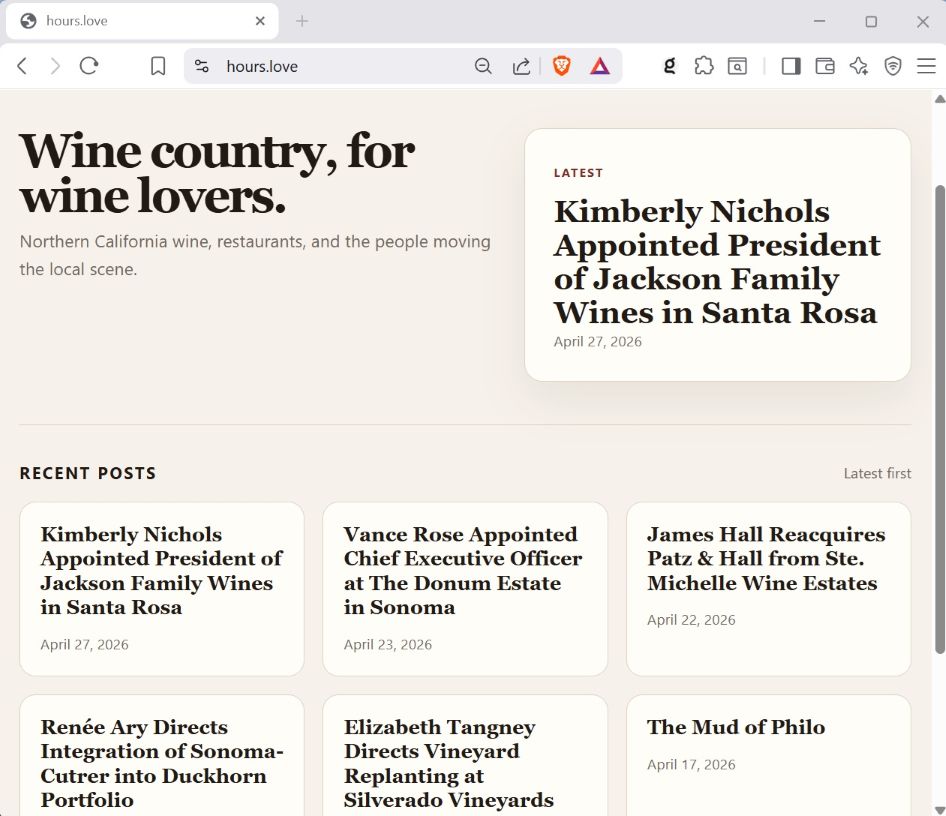
I created a engagement farming bot that produces a clean, readable, and interesting blog post once per day. You can take my approach to create a similar bot, on the topic of your choosing. You can deploy a fleet of bots, to produce blog posts to dozens of different websites. In fact, you could potentially create a meta-bot pipeline that scours the web for trending topics, and then creates a bot to write on that topic.
I just began my GenAI automation pipeline journey, and look forward to exploring future use cases.